Bring your comments home.
Move to Convocept without losing a single conversation. Import Disqus today; the rest of your stack is either already compatible or on the way in 1.1.
Disqus
Available in 1.0Import the Disqus XML export: comments, replies, authors and dates, matched to your posts. Tested with 100,000 comments.
WordPress comments
Nothing to importConvocept reads the same wp_comments table. Activate it and your existing comments are in the new thread.
wpDiscuz
Comments now, votes in 1.1wpDiscuz comments are already native WordPress comments. The 1.1 importer adds votes and subscriptions.
Subscribe to Comments Reloaded
Coming in 1.1The plugin is closed. The 1.1 importer moves its subscribers to Convocept’s subscriptions, keeping their consent.
Import from Disqus in the dashboard
- 1
In your Disqus admin, open Moderation → Export (on some accounts Community → Export). Disqus emails a link to an XML file (sometimes gzipped) — both formats work.
- 2
Install and activate Convocept, then open Comments → Convocept → Import in your WordPress dashboard.
- 3
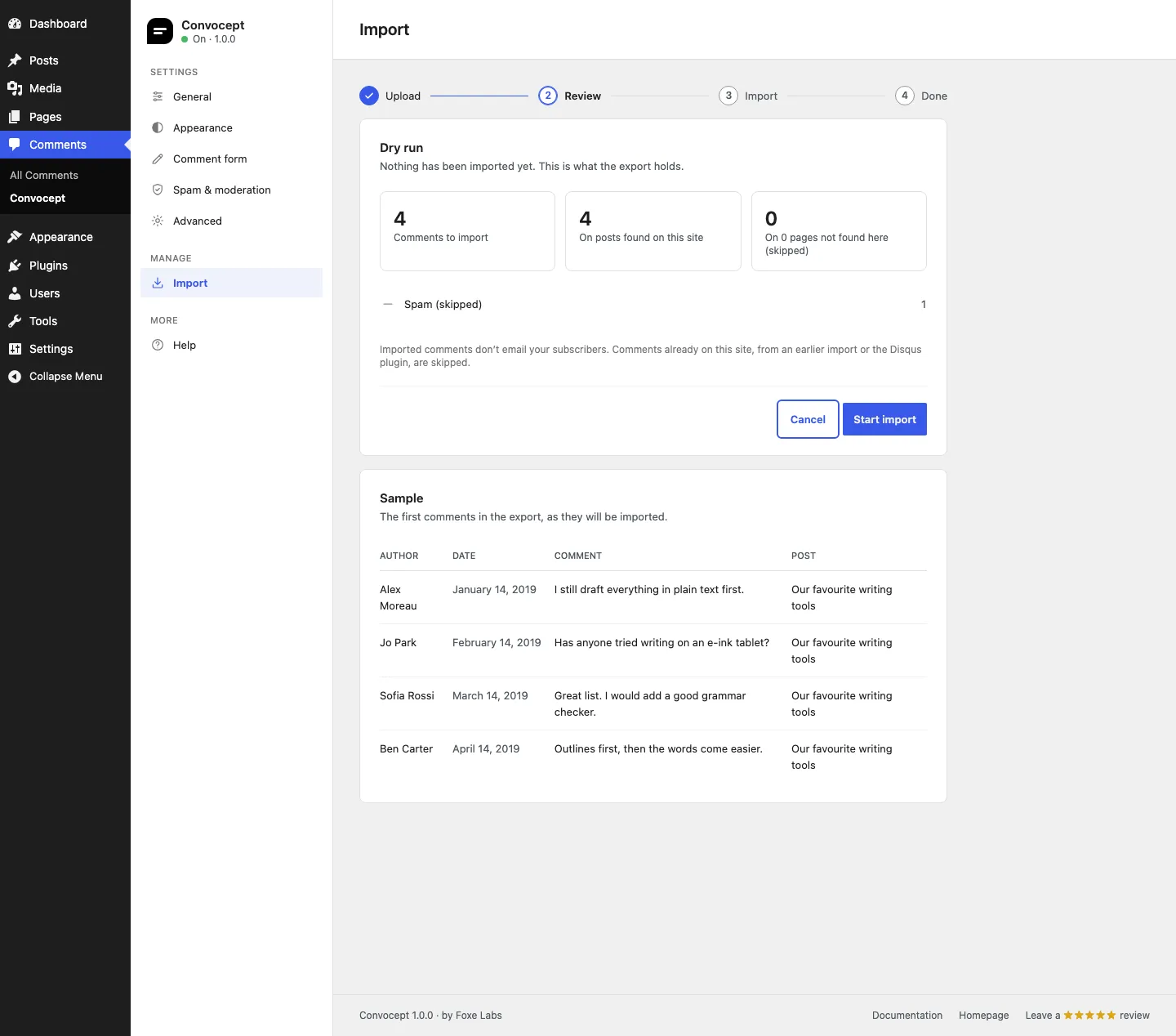
Upload the file. A dry run shows how many threads, comments and authors will be imported, and which posts they match.
- 4
Start the import. It runs in batches in the background, so large exports do not time out. You can close the tab and come back.
- 5
Check a few posts, then deactivate the Disqus plugin. Your comments now render from your own database.
Or from the command line
For big sites, the import command has no request time limits. It runs a dry run first and asks before writing anything.
# Analyse the export, then import it
wp convocept import disqus disqus-export.xml.gz

# Only analyse; import nothing
wp convocept import disqus disqus-export.xml --dry-run

# Check on, resume or cancel a running import
wp convocept import status
wp convocept import resume
wp convocept import cancel
Imports you can run twice
No duplicates
Run the same export again and already-imported comments are skipped.
No surprise emails
Imported comments never trigger subscriber notifications.
Spam left behind
Comments Disqus marked as spam or deleted are not imported.
Dry run first
See exactly what will be imported before anything is written.
Questions, answered
Do I need to keep Disqus active during the import?
No. The import only needs the XML export file. Keep Disqus active until you have checked the result if you want readers to see comments without a gap.
What if my export is very large?
Use WP-CLI, which avoids web request limits entirely. It has been tested with an export of 100,000 comments. In the dashboard, the import runs in background batches and can resume if interrupted.
Will comment authors keep their names and avatars?
Names, dates and threading are kept. Avatars come from Gravatar as with any WordPress comment, so authors who used the same email there get their picture.
Can I undo an import?
Imported comments are normal WordPress comments, so you can bulk-trash them from the Comments screen. Cancelling an import in progress keeps what was already imported.
Stuck halfway? We will help.
Moving a big site? Email us your site URL and the size of your export.